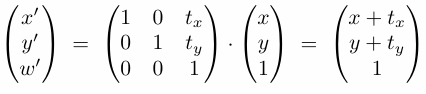
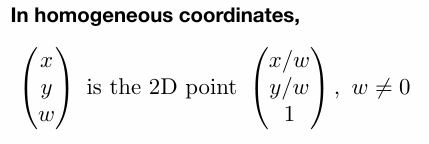
games101-note-L6 Rasterization 2 (Antialiasing and Z-Buffering)

Sampling Artifacts in Computer Graphics 采样造成的走样

锯齿 Jaggies – 空间采样

摩尔纹 Moire Patterns – 欠采样图像 undersampling

车轮效应 Wagon wheel effect – 时间采样

。。。

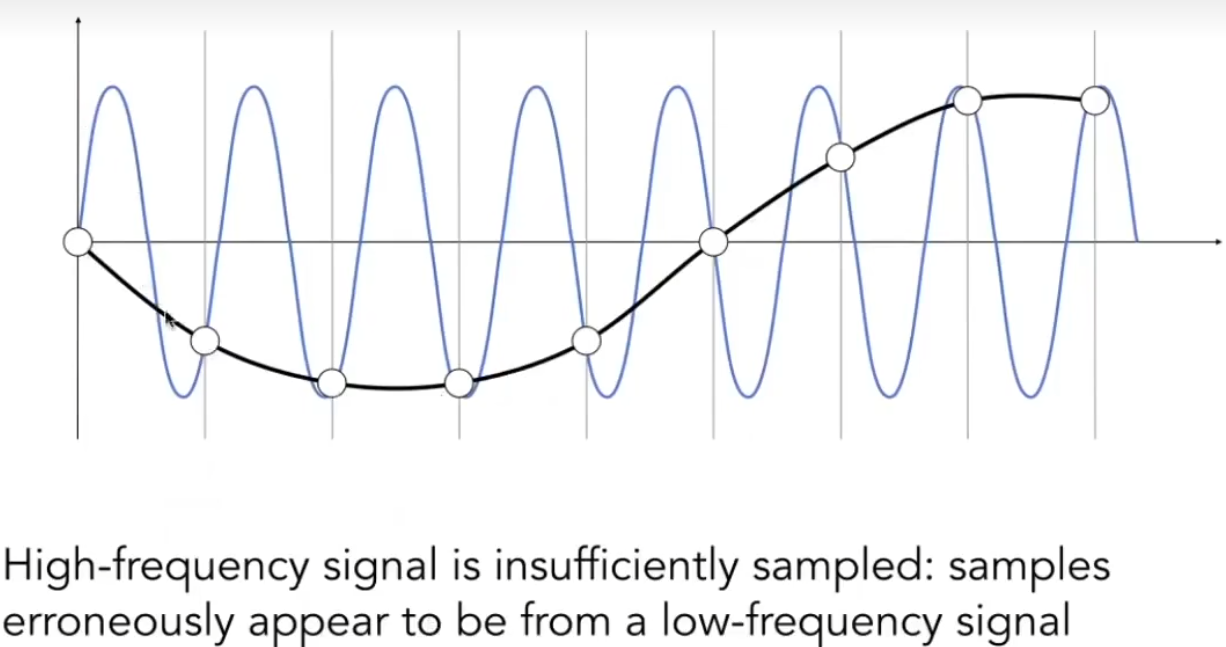
根本原因:信号改变太快(high frequency),但是采样太慢。

抗锯齿采样: Antialiased Samping
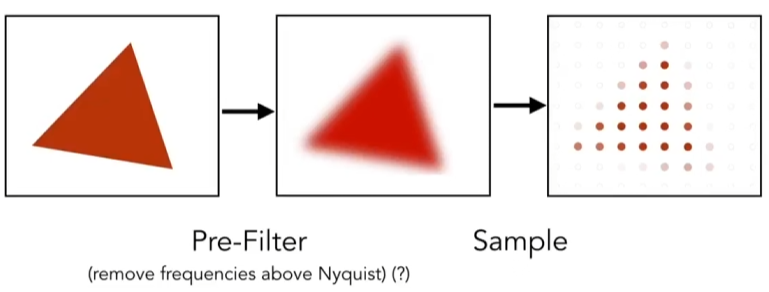
1715700990355

Frequency Domain 频域

从频域分析走样:

高频信号采样不足:采样结果显示为低频信号

在给定的采样频率下,两种频率无法被区分的现象称为走样

High-frequency signal is insufficiently sampled: samples
erroneously appear to be from a low-frequency signal

Two frequencies that are indistinguishable at a given sampling
rate are called “aliases”

滤波

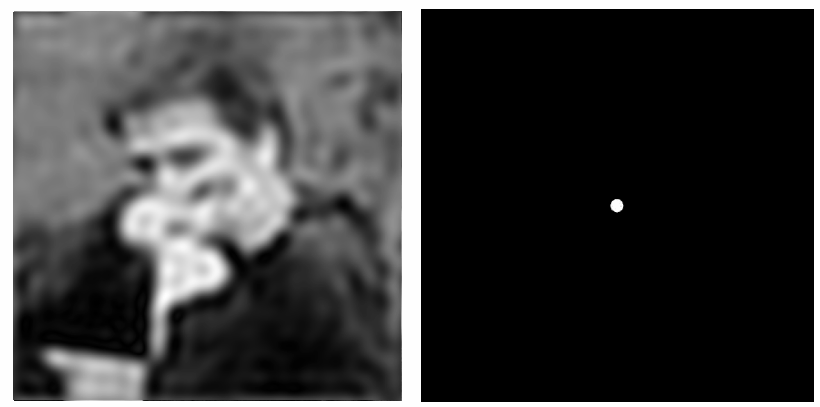
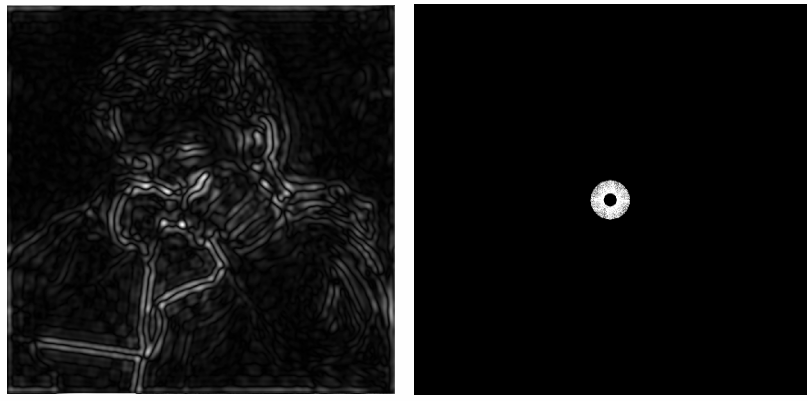
Filtering = Getting rid of certain frequency contents
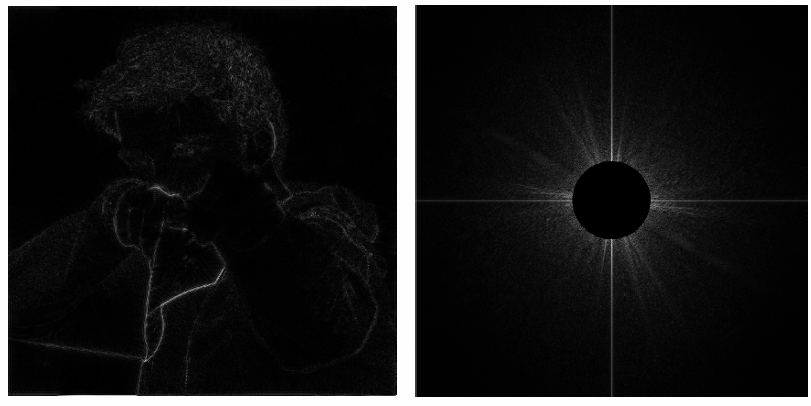
High-pass filter

 Low-pass filter

Filter Out Low and High Frequencies

Filtering = Convolution (= Averaging):

卷积定理:

时域卷积 = 频域乘积

时域乘积 = 频域卷积

Convolution in the spatial domain is equal to multiplication
in the frequency domain, and vice versa

Option 1:
• Filter by convolution in the spatial domain
Option 2:
• Transform to frequency domain (Fourier transform)
• Multiply by Fourier transform of convolution kernel
• Transform back to spatial domain (inverse Fourier)
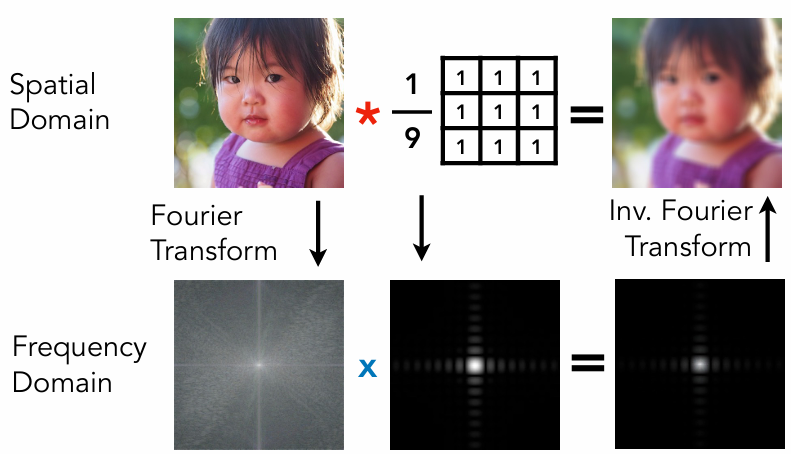
时域卷积 = 频域乘积

Wider Filter Kernel = Lower Frequencies
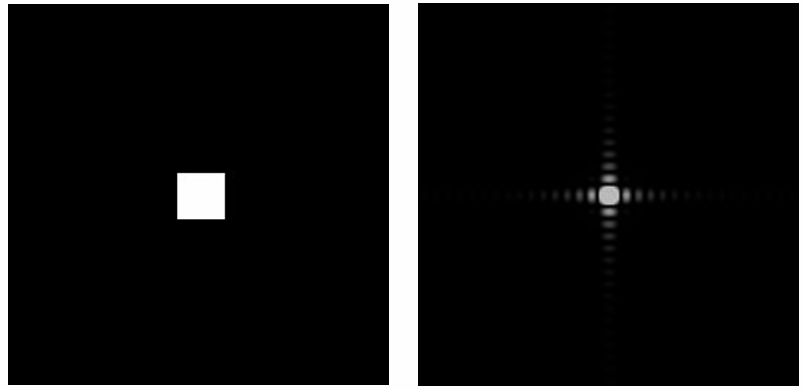
Wider Filter Kernel = Lower Frequencies

Sampling = Repeating Frequency Contents
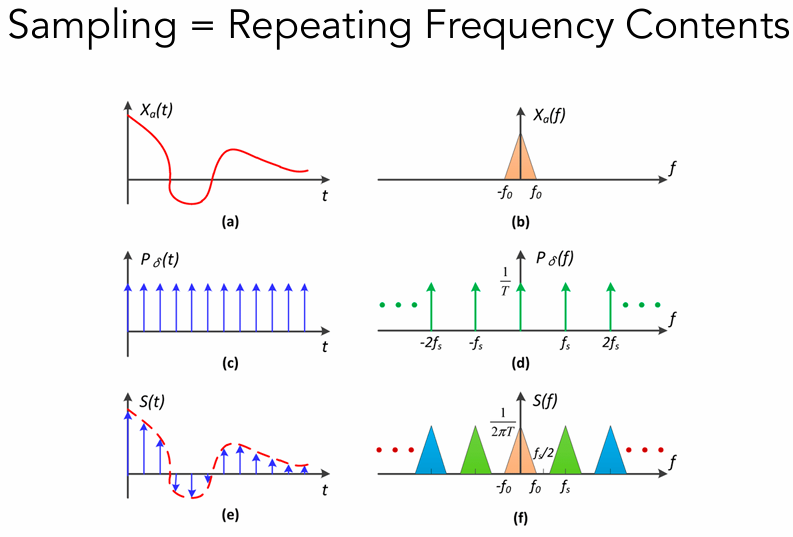
如(f)所示,采样在频域就是在重复原始信号的频谱

Aliasing = Mixed Frequency Contents

走样相当于采样后的频谱发生了混叠
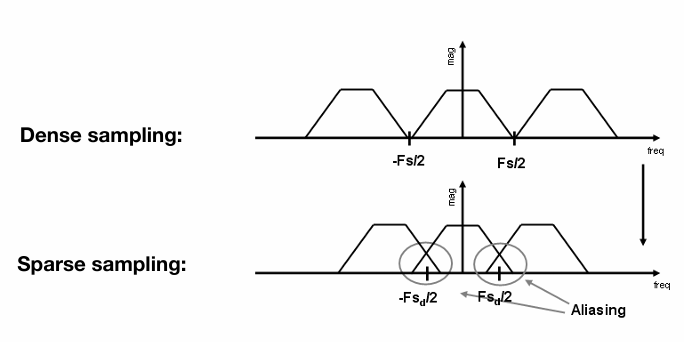
Aliasing = Mixed Frequency Contents

Antialiasing 反走样

如何减少走样误差?How Can We Reduce Aliasing Error?

Option 1: Increase sampling rate
• Essentially increasing the distance between replicas in the
Fourier domain
• Higher resolution displays, sensors, framebuffers…
• But: costly & may need very high resolution
Option 2: Antialiasing
• Making Fourier contents “narrower” before repeating
• i.e. Filtering out high frequencies before sampling

Antialiasing = Limiting, then repeating
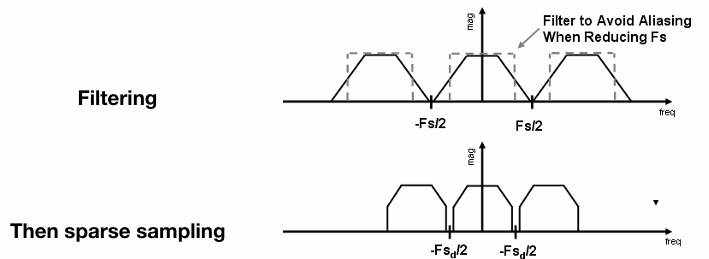
Antialiasing = Limiting, then repeating

Antialiasing By Averaging Values in Pixel Area

Solution:
• Convolve f(x,y) by a 1-pixel box-blur

Recall: convolving = filtering = averaging

• Then sample at every pixel's center

In rasterizing one triangle, the average value inside a pixel area of f(x,y) = inside(triangle,x,y) is equal to the area of the pixel covered by the triangle.
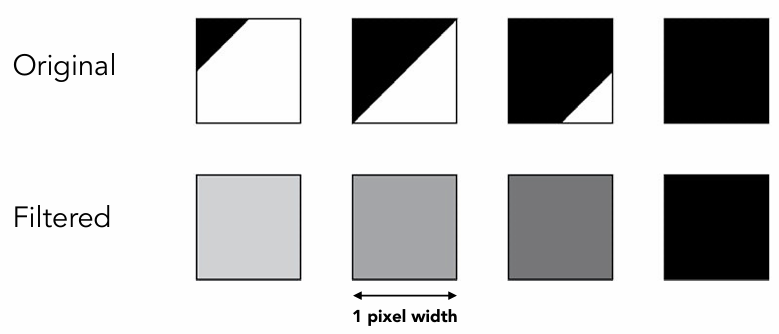
Averaging Values in Pixel Area

Antialiasing By Supersampling(MSAA)

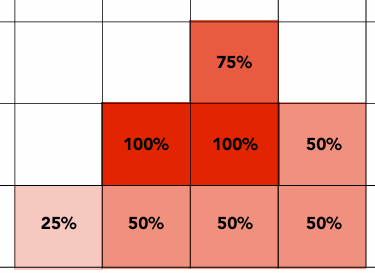
Supersampling 超采样:

Approximate the effect of the 1-pixel box filter by sampling multiple locations within a pixel and averaging their values:
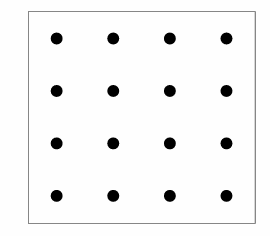
 4x4 supersampling

Supersampling: Step 1

Take NxN samples in each pixel.
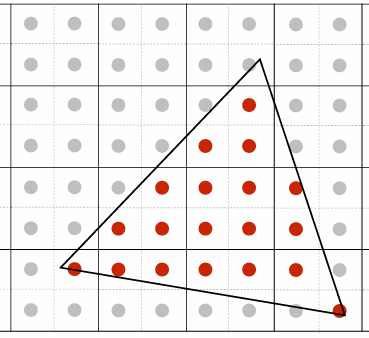
2x2 supersampling

Supersampling: Step 2

Average the NxN samples “inside” each pixel.

如第二排第三个点,超采样中有3个点在三角形中,所以该像素取75%灰度
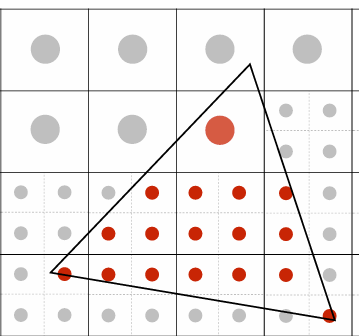
Average the NxN samples

Average the NxN samples

Antialiasing Today

No free lunch!
• What’s the cost of MSAA?
Milestones (personal idea)
• FXAA (Fast Approximate AA) 快速近似抗锯齿:得到一副有锯齿的图,把边界换成无锯齿的
• TAA (Temporal AA) 时间抗锯齿:复用上一帧的像素的值,每帧采样的位置有变化
Super resolution / super sampling 超分辨率
• From low resolution to high resolution
• Essentially still “not enough samples” problem
• DLSS (Deep Learning Super Sampling)
games101-note-L5 Rasterization 1(Triangles)

Perspective Projection

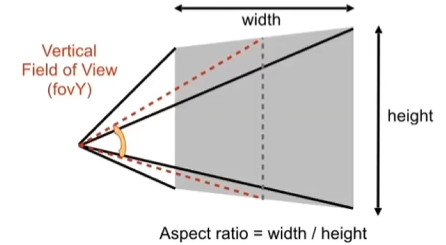
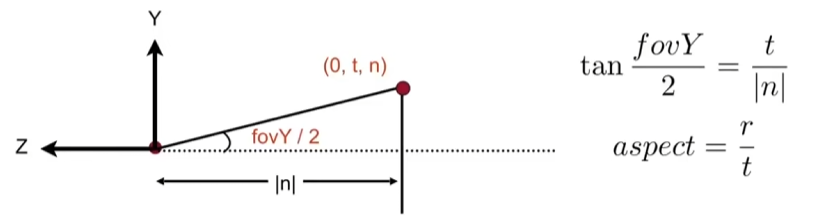
有时使用人们使用视场角和长宽比来描述Frustum。

img

vertical field-of-view 垂直视场角(fovY)

aspect ratio 长宽比

Rasterization

Diffrent raster display

1.Osciloscope 示波器

2.Cathode Ray Tube 阴极射线管

通过光栅扫描显示,一种减少扫描量的方法:隔行扫描。

一些视频压缩也用到过。但是对于高速运动会造成严重的画面撕裂。

3.Flat Panel Displays

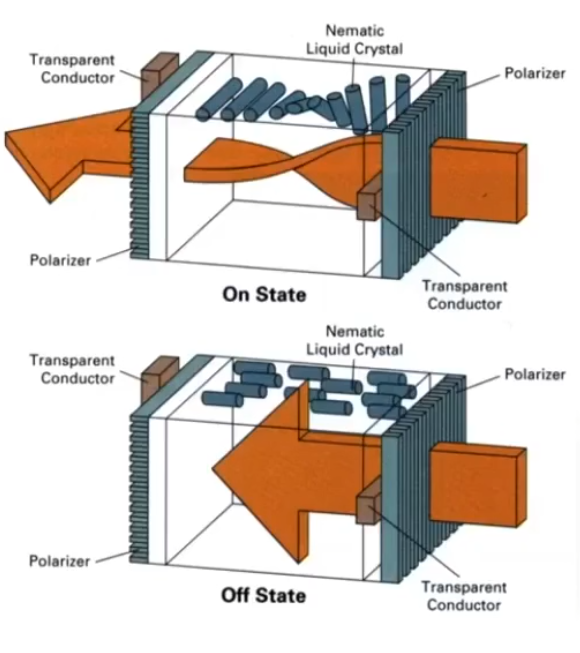
LCD(Liquid Crystal Display)液晶显示器

液晶显示器利用偏转液晶来修改光的偏振方向来影响光的传输和阻挡。

具体来说:当开启状态时,液晶偏转使得光通过,反之光被阻挡。

4.LED Array Display

5.Electrophoretic Display 电泳显示

优点:自然,省电
缺点:刷新率低

Rasteriazation: Drawing to Raster Displays

为什么使用三角形作为形状基元

1.最基础多边形,可以才分其他多边形

2.保证是平面

3.良好定义的内部

4.便于进行插值(barycentric interpolation 重心插值)

Sampling 三角形的离散化:

利用采样离散化一个函数。

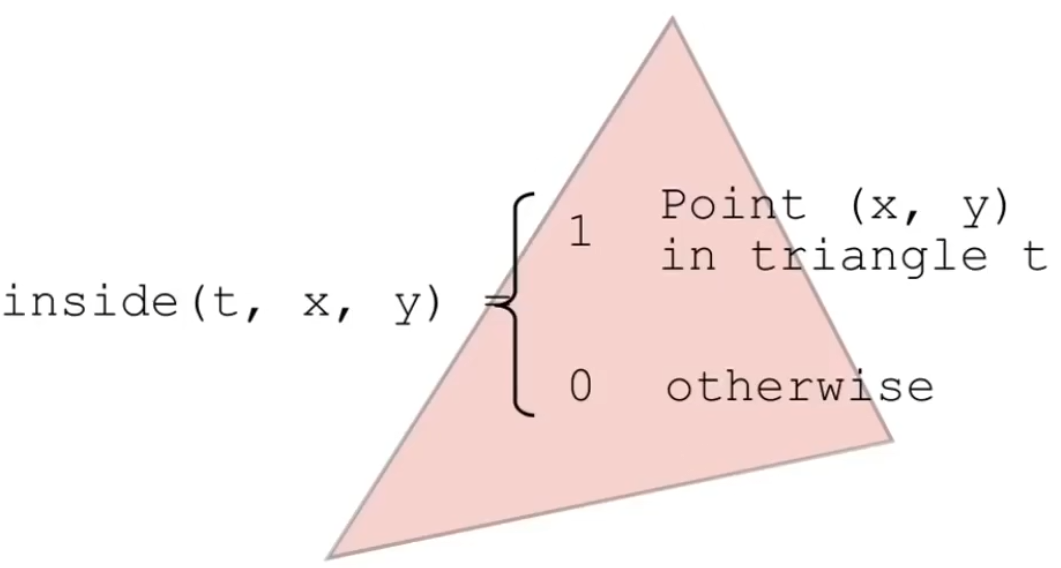
采样一个三角形(判断该像素点中心是否在三角形内):

利用向量叉积来判断该点是否在三角形内。

Eage Cases:(自定义一个标准)

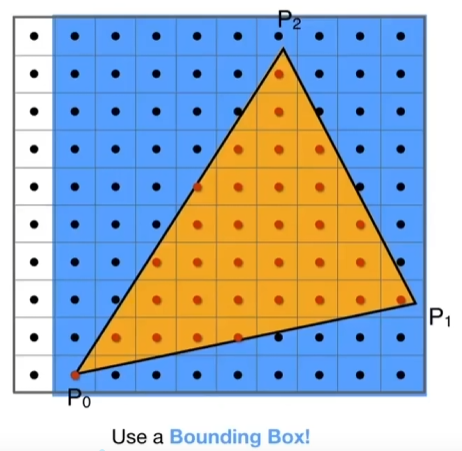
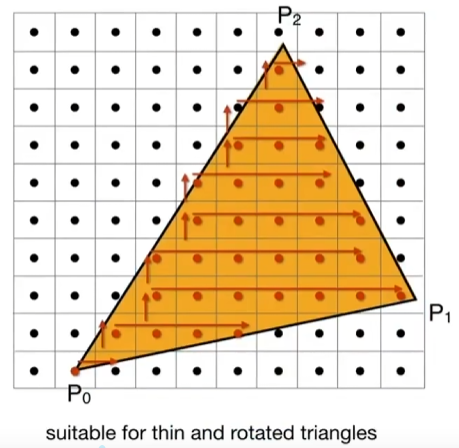
不需要检测屏幕上的所有像素:

使用边界盒子(三角形的长方形边界)

或者增量三角形遍历

一个问题:

锯齿Jaggies。

games101-note-L4 Transformation Cont.

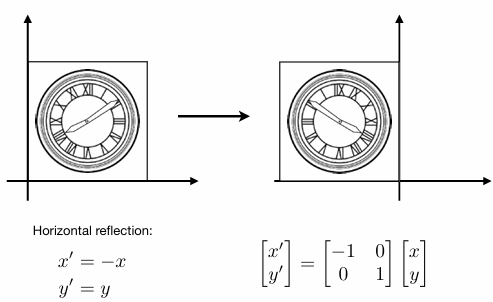
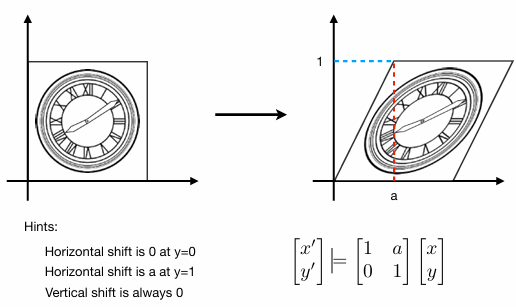
3D transformation

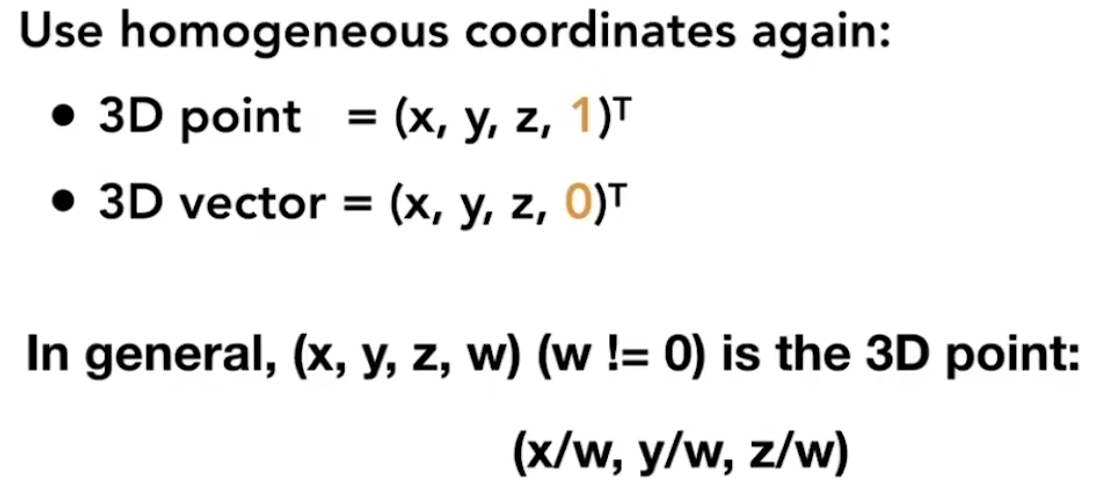
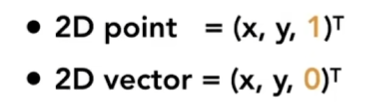
1.3D homogeneous coordinates:

3D homogeneous coordinates

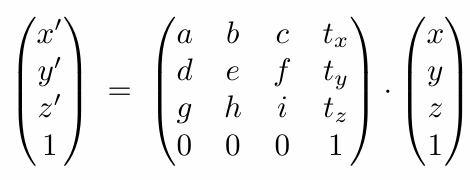
2.3D affine transformations:

1716368230451

问题:对于仿射变换而言,是先进行平移还是线性变换?

展开后可以得到,是先应用的线性变换,再加上的平移量

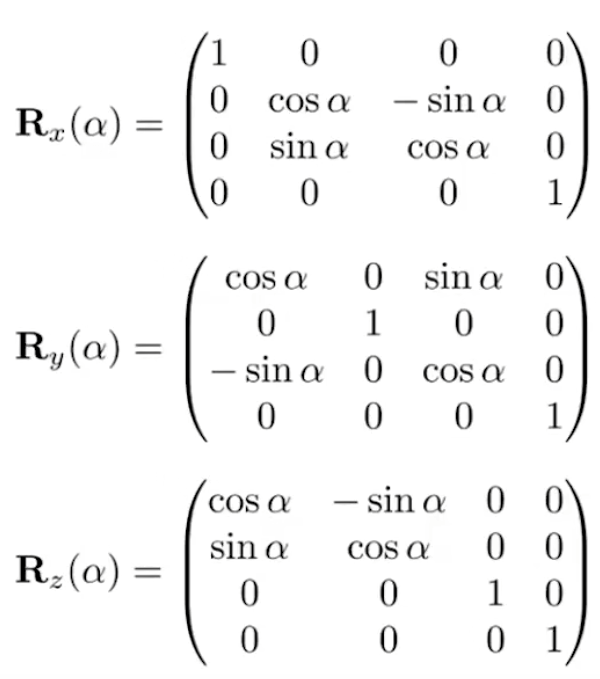
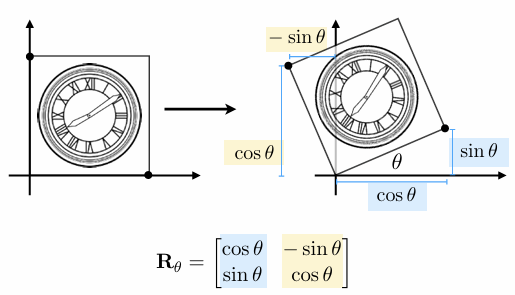
3.Rotation around x y z -axis

Rotation around x y z -axis

为什么R_y的sin的符号不一样?

因为应该按照右手螺旋定则 应该是zx -》+ y,所以xz是相反的-y

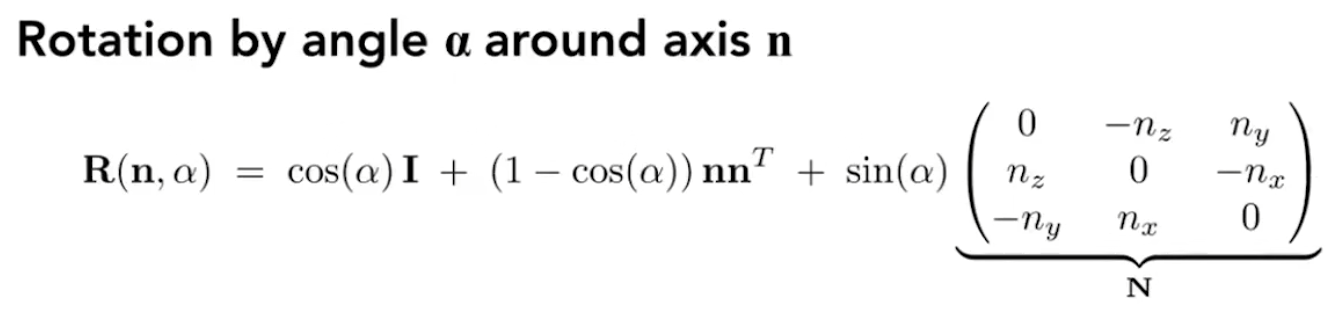
4.Rodrigues’ Rotation Formula

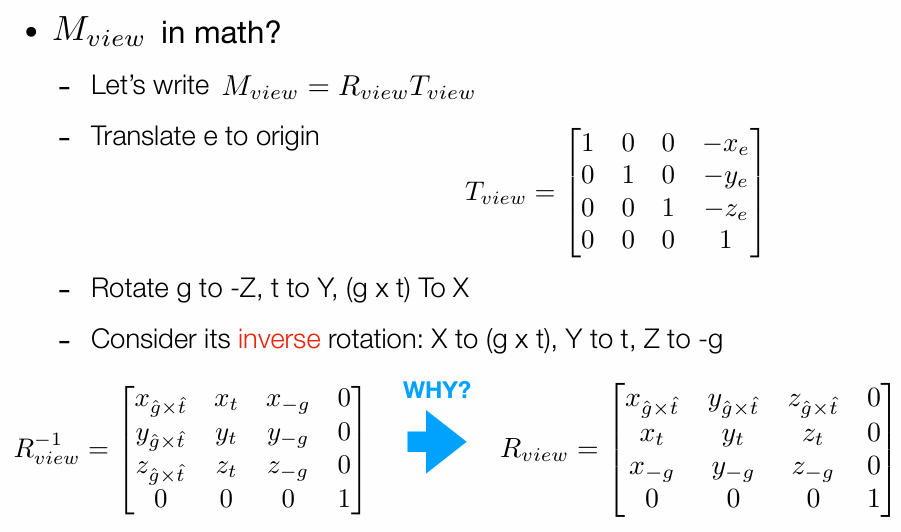
View/Camera Transformation

定义一个相机:

  1. 位置
  2. 视线方向
  3. 向上方向

关键点:当相机和物体一起移动,相片不变
约定:

1.移动相机到The origin, up at Y, look at -Z
2.同时让物体进行相同的移动

因为要先平移再旋转,所以不能直接用仿射变换写出来,要两个单独写再相乘。

Projection transfomsation

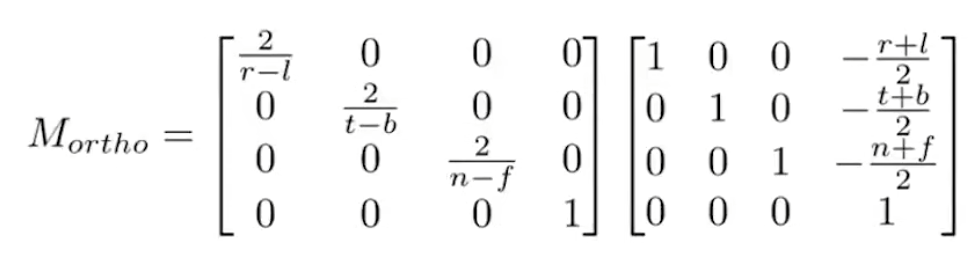
  1. Orthographic projection

    Translate (center to origin) first, then scale (length/width/height to 2)

    img

    摄像头沿着-z看,所以n>f。

    所以OpenGL使用了左手坐标系,来让n<f。

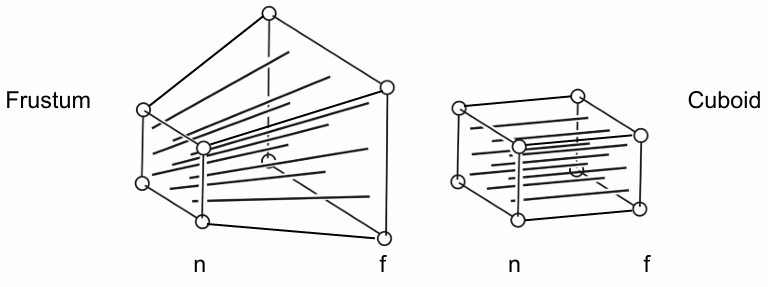
  2. Perspective projection

    先从透视到正交 M_persp->ortho,再做正交投影 M_ortho
    推导 M_persp->ortho:

    想象将furstum挤压为cuboid

    squeez
    约定:near面和far面都不变,即z不会变化。并且中心点不会发生变化。

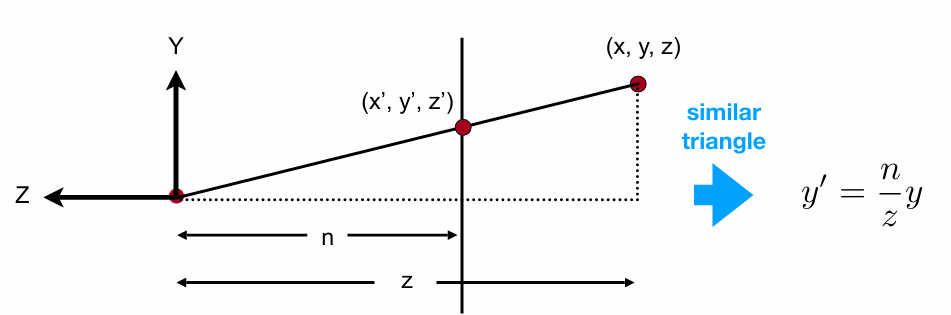
    1. 先用所有同一个面的x, y和near plane满足相似关系,推导出x,y的变换。

      相似关系

      相似关系
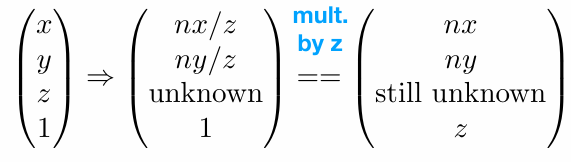
      得到变换前后关系:(广义坐标homogeneous coordinates)

      前后关系
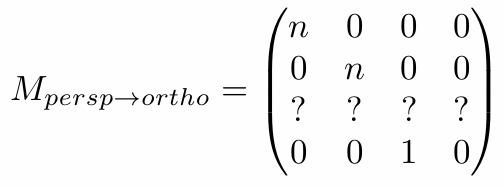
      由此推导出变换矩阵的大部分参数:

      推导出变换矩阵的大部分参数

    2. 再用near plane需要所有点不变以及far plane的z坐标不变(特别是far plane的中心点完全不变),推导出z的变换。

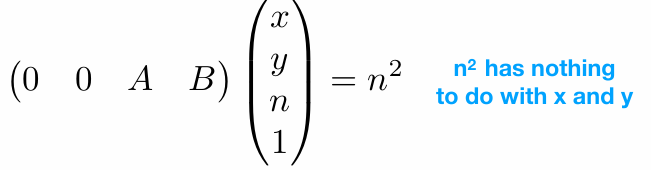
      Any point on the near plane will not change
      Any point on the near plane will not change

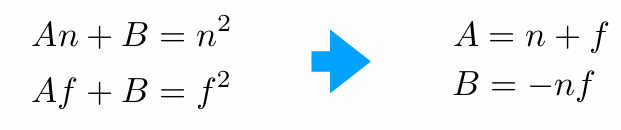
      So the third row must be of the form (0 0 A B)
      第三行

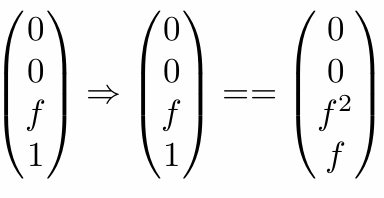
      Any point’s z on the far plane will not change
      1716369110881

      两个方程,两个未知数,可解出A和B的值:
      1716369183254
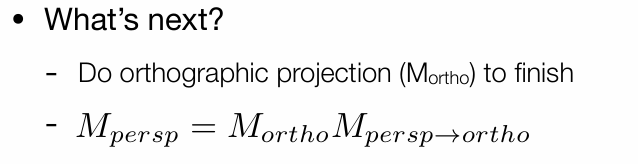
      透视投影矩阵 = 正交投影矩阵 * 透视到正交矩阵
      1716369194139

Insert picture with Typora extension in Hexo

在Hexo中利用Typora插件便捷插入图片

Typora插件

Typora Extension

试用了下Vscode中的Typora插件,发现它支持直接将图片复制到md中,并自动生成对应md语句以及存储图片文件到当前目录下(image/insert-picture-with-Typora-extension-in-Hexo/1714922308235.png)。

生成问题

这个功能很便捷,但是在因为该image文件夹在_posts文件夹下,Hexo并没有将其复制到public文件夹里(复制过去路径应该也不正确)。

添加复制脚本

我使用了如下脚本来让Hexo在生成时将image文件夹复制到对应位置

1
2
3
4
5
6
7
8
9
10
11
12
13
14
15
16
17
18
// scripts/copy-images.js
var fs = require('hexo-fs');
var path = require('path');

hexo.on('generateBefore', function() {
var sourceDir = hexo.source_dir;
var publicDir = hexo.public_dir;
var imageDir = path.join(sourceDir, '_posts/image');

fs.exists(imageDir).then(exist => {
if (exist) {
return fs.copyDir(imageDir, path.join(publicDir, 'image'));
}
}).catch(err => {
console.error('Error copying images:', err);
});
});

最后就可以愉快的使用截图加复制来插入图片啦(●’◡’●)!

Insert single html

尝试在博客中插入单独的html

方法1:直接写入 容易影响其他页面

最初使用了如下tag脚本来将对应html直接写入md中,但这样会导致渲染主页时包含独立样式的html的污染主页样式。

1
2
3
4
5
6
7
8
9
hexo.extend.tag.register('include_html', function(args) {

const fs = require('fs');
const path = require('path');
const filePath = path.join(hexo.source_dir, '_html', args[0]);
const htmlContent = fs.readFileSync(filePath, 'utf8');
return htmlContent
});
调用: {% include_html "testsingle.html" %}

方法2:使用iframe元素 效果较好

最后使用了如下tag脚本来生成对应iframe元素

1
2
3
4
5
6
7
8
9
10
11
12
13
14
15
16
hexo.extend.tag.register('include_iframe', function(args) {
const path = require('path');
const fs = require('fs');
const filePath = path.join(hexo.source_dir, 'html', args[0]);

// 检查文件是否存在
if (!fs.existsSync(filePath)) {
console.error('File does not exist:', filePath);
return '<p>Error: HTML file does not exist.</p>';
}

// 构建iframe标记,引用HTML文件
const urlPath = '/html/' + args[0];
return `<iframe src="${urlPath}" style="width:100%; height:100%; border:none;"></iframe>`;
});
调用: {% include_iframe "testsingle.html" %}

方法2效果:

如果想原封不动的放入单个html,在md中设置layout: false即可

MuJoCo中actuator执行器产生力的计算方式

refer from: https://mujoco.readthedocs.io/en/stable/computation/index.html#geactuation
computation -> force generation
每个执行器生成一个标量力pi,这个力是一个函数,取决于执行器的激活状态ui、速度wi、位置qi和外部控制信号li。

该力生成机制是执行器特定的,不能与模型中的其他执行器交互。当前,当存在激活状态时(如软体机器人),力是关于激活状态的仿射函数;否则是关于控制信号的仿射函数: pi = (aui 或 auli) + b0 + b1qi + b2li 其中a是增益参数,b0、b1、b2是偏置参数,这些参数存储在模型中。

通过设置不同的增益和偏置参数,可以模拟直接力控制、位置控制和速度控制等。还可以通过安装回调函数计算自定义的增益和偏置项。

仿射力生成使得可以从反动力学计算的应用力中推断出控制/激活状态,利用力矩臂矩阵的伪逆。

但某些执行器不是仿射的(如带有嵌入式低级控制器),因此考虑扩展上述模型。

所有执行器产生的广义坐标力之和存储在mjData.qfrc_actuator中,并加到应用力向量r中,与用户定义的关节或笛卡尔力(存储在mjData.qfrc_applied和mjData.xfrc_applied)一起。

Jittering issue with model containing meshes in MuJoCo

refer from: [computation -> force generation]
https://roboti.us/forum/index.php?threads/custom-mesh-jittering-in-mujoco-environment-in-openai-gym.3860/)

The collision mechanism uses the convex hull of the mesh, and generates a single contact with the box. When the convex hull has large flat areas, this single contact has to run around (over time steps) to prevent penetration over the entire surface.

There are two solutions to this problem:

1. Replace the ground box with a plane (or is it already a plane?) and use MuJoCo 2.0. The latest version of the collision detector generates multiple contacts between a mesh and a plane, which results in more stable simulation. But this only works for plane-mesh, not for box-mesh.

2. The better solution is to break the mesh into several meshes, and include them as multiple geoms in the same body. Then MuJoCo will construct the convex hull of each sub-mesh, resulting in multiple contact points (even without the special plane mechanism mentioned above) and furthermore it will be a better approximation to the actual object geometry.

拆分网格为多个子网格,根据模型的自由度整除3增加子网格的数量

Break it into even more meshes. At rest, each contact point immobilizes 3 DOFs. A rigid body has 6 DOFs, and your object has an extra internal DOF, so that makes 7. So you need 3 active contacts, i.e. the object should be broken into at least 3 sub-meshes.

Choreonoid installation

choreonoid installation for HVAC

1
2
3
$ git clone https://github.com/choreonoid/choreonoid.git

$ git clone https://github.com/ytazz/vnoid.git

把vnoid放到choreonoid/ext

1
2
3
4
5
6
7
8
9
10
11
12
13
14
15
$ cd choreonoid 

$ sudo apt install build-essential

$ misc/script/install-requisites-ubuntu-20.04.sh

$ mkdir build

$ cd build

$ cmake .. -DCMAKE_INSTALL_PREFIX={install_path} -DBUILD_POSE_SEQ_PLUGIN=ON -DBUILD_BALANCER_PLUGIN=ON -DBUILD_MOCAP_PLUGIN=ON -DBUILD_HRP4C_HANDLER=ON -DBUILD_MEDIA_PLUGIN=ON

$ sudo make -j8

$ make install

Build blog web using hexo, github and cloudflare

利用hexo库构建博客模板 Ultilize hexo lib to build blog

Refer from:https://hexo.io/zh-cn/index.html

install node.js from https://nodejs.org/en

install hexo:

1
2
3
$ npm install hexo-cli -g
$ hexo init blog
$ npm install

add new blog:

1
hexo new [layout] <title>

configure the themes:

1
2
3
theme: land
theme_config:
banner: "images/banner.png"

利用github存储博客生成文件 Ultilize Github to storage blog building file

1.Create a repository on Github
2.git remote add origin <repository_link>
3.git push -u origin master
4.git push -u origin <branch-name>

利用Cloudflare托管并自动生成网页文件 Ultilize Cloudeflare to host and automatically generate web page files

1.Sign up Cloudflare and enter the dashboard
2.Enter Worker&Pages section
3.Create application –> Pages –> Connect to Git
4.Set Environment variables NODE_VERSION = {Current using node version}
5.Set Build configurations Build command = npx hexo generate Build output directory = /public

custom domain

1.Buy a domain on NameSilo
2.Set domain name servers to love.ns.cloudflare.com, trevor.ns.cloudflare.com for Cloudflare to host
3.Set domain host in Cloudflare dashboard –> website
4.Set custom domains in Cloudflare dashboard –> Pages